XLR vs USB Microphones
USB is one cable and done. XLR is a system you grow. The honest difference in sound is smaller than the difference in what each one lets you do next.
Buy USB if you are recording one voice into one computer, which is most people. Buy XLR when you need more than one microphone, specific high-end microphones, or hardware control. If you are unsure, buy a microphone that has both and stop thinking about it. The sound-quality gap between the two routes is much narrower than it was ten years ago, and narrower than the internet suggests. What you are really choosing between is a finished appliance and a modular system.
What the difference actually is
Every microphone produces an analogue signal, and that signal has to be amplified and converted to digital before a computer can use it. The only question is where that happens.
A USB microphone does it inside the microphone. The preamp and the analogue-to-digital converter are built in, so the thing that comes out of the cable is already digital audio your computer understands. One cable, no driver fuss, no extra box.
An XLR microphone does none of it. It outputs a raw analogue signal over a balanced three-pin cable and relies on an audio interface or mixer to supply power if the mic needs it, apply preamp gain, and convert to digital. The microphone is half the purchase; the interface is the other half.
That is the entire technical distinction. Note what it is not: XLR is not a different grade of microphone. The same capsule can appear in both, and hybrid microphones that offer both connections exist precisely because the capsule does not care.
Does XLR sound better?
At a given total budget, usually not. Spend a fixed amount on a good USB microphone and you put all of it into one well-engineered device. Spend the same amount split between an XLR microphone and an interface and you have bought two cheaper things, and the cheap preamp in a budget interface is a real limitation — particularly with dynamic microphones, which output a quiet signal and need a lot of clean gain.
XLR starts winning as the budget rises. The top of the microphone market is XLR-only, high-quality preamps are genuinely audible on a quiet voice, and converters improve. But the threshold is higher than most creators are spending, and nobody listening to a podcast has ever identified the connector.
The thing that actually determines how your recording sounds is not the connector. It is the room, the distance from your mouth to the microphone, and whether the capsule type suits the space — which is why dynamic vs condenser is the more consequential decision of the two.
Where USB genuinely wins
Total cost. One purchase, one cable. No interface, no phantom power to think about, no XLR cable to buy.
Simplicity.It appears as an input device and every application finds it. There is no gain staging to learn before your first recording, which matters more than enthusiasts admit — the setup you actually use beats the one you are still configuring.
Monitoring. Good USB microphones have a headphone jack on the body that lets you hear yourself before the signal reaches the computer, so there is no delay. This is the feature that teaches you mic technique, because you can hear immediately what moving two inches does.
Onboard processing.Several USB microphones now include hardware DSP — compression, limiting, denoising — applied before the recording exists. For a solo creator who does not want to learn audio processing, that is a genuine advantage over a bare XLR mic.
Where XLR genuinely wins
More than one microphone. This is the big one. Two USB microphones into one computer is awkward at best and unreliable at worst, while a two-input interface records two XLR mics to two separate tracks as a matter of course. If a second person will ever sit down with you, this is the reason to go XLR.
Microphone choice. The entire professional catalogue is XLR. If a specific microphone is the point, it may simply not be available any other way.
Hardware control. Physical faders, hardware processing and routing, a mute button that is a button. Streamers running complex audio setups want a mixer, and mixers are XLR.
Cable runs. XLR is balanced, so it rejects interference over long distances. A twenty-foot run to a boom-mounted microphone is routine; USB gets unhappy well before that.
How this is funded:we earn a commission if you buy through our links, at no extra cost to you. It never changes which product we recommend, and we’ll tell you plainly when to skip one. Full disclosure.
Quick picks
Ranked on published specs and buyer fit. Select a row to jump to the full write-up. We have not tested these products — here is exactly what we do instead.
| # | Product | Best for | Price |
|---|---|---|---|
| 1 | 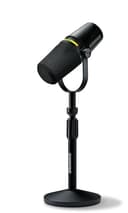 Shure MV7+ The mic that fixes bad rooms, in its current form. The same forgiving dynamic capsule that made the original MV7 the default podcast mic, now with USB-C, onboard digital processing and a real-time denoiser. Shure has discontinued the original MV7, so this is the MV7 you buy new today. | Best of both | $319.00 · View on Amazon Price as of October 5, 2026. #ad How we’re funded |
| 2 | 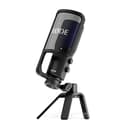 RODE NT-USB+ A studio-grade USB condenser that skips the complexity. Plug it into a computer, hear yourself through the built-in headphone jack with zero latency, and record clean, detailed voice with no interface to buy. Condensers pick up room sound, so it wants a quiet, treated space — get that right and it sounds superb. | Best USB-only | |
| 3 | 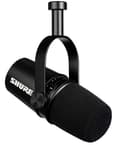 Shure MV7 The mic that fixes bad rooms. A dynamic mic modeled on the legendary SM7B, it rejects room echo and background noise the way condensers can't, so it forgives an untreated home office. USB and XLR outputs mean it grows with you. For podcasting and voice in a real-world room, it is the smart pick. | Best value hybrid | $299.00 · View on Amazon Price as of October 5, 2026. #ad How we’re funded |
Which of these to buy
For most people the answer is a hybrid, and the Shure MV7+ is the one we point at most often: a cardioid dynamic with USB-C and XLR, onboard DSP and a real-time denoiser. Plug it into a laptop today and record; add an interface in two years and the same microphone is still the right microphone. That is the purchase you do not re-make. The earlier Shure MV7 does the same job with USB and XLR for less, if you can find it at a good price.
If you know you are staying USB-only — one voice, one computer, no ambitions toward a mixer — then do not pay for an XLR port you will never use. The RODE NT-USB+ is a USB condenser with a built-in headphone output, and it is excellent for voiceover and detailed vocal recording in a quiet room. Just be clear-eyed about the room: as dynamic vs condenser explains, a condenser in a noisy space is the most common expensive mistake in home audio.
Note what is not listed here: an audio interface. The registry does not carry one, and we are not going to point you at hardware we have not documented. If you do go the XLR route, budget for the interface as part of the microphone purchase rather than an afterthought — that is the single most common reason an XLR build costs more than people planned. The full desk-mic comparison is in our USB microphone roundup.
Frequently asked questions
Is an XLR microphone better quality than USB?
Not inherently. Both convert sound the same way; the difference is where the analogue-to-digital conversion happens — inside a USB mic, or inside a separate interface for XLR. A good USB microphone easily beats a cheap XLR mic plugged into a cheap interface. XLR wins at the higher end and when you need more than one microphone.
Do I need an audio interface for an XLR microphone?
Yes. An XLR microphone outputs an analogue signal with no power and no conversion, so it needs an interface or mixer to supply power if required, apply preamp gain and convert to digital. That is the real cost of going XLR: the microphone is only part of the purchase.
Which is better for podcasting and streaming?
USB for one person, XLR once you have two or more people in the room. A single USB mic is simpler, cheaper and sounds excellent. The moment you need two microphones recorded to separate tracks, or you want a hardware mixer in the chain, XLR and an interface become the practical option rather than the premium one.
Can I use a USB microphone with an audio interface?
No, not directly — a USB microphone outputs digital audio and connects to a computer, while an interface expects an analogue XLR input. This is exactly why hybrid microphones with both a USB and an XLR output exist: the same microphone covers both routes.
Is USB latency a problem for recording?
Rarely, and most good USB microphones sidestep it entirely with a headphone output on the mic itself, which monitors the analogue signal before it reaches the computer, so you hear yourself with no delay. Latency only becomes a real issue when you are monitoring through software, which is more of a music-production concern than a voice one.
What is the advantage of a hybrid USB and XLR microphone?
It removes the decision. You plug it into a computer today with no interface and no extra spend, and if you later add an interface or move to a multi-mic setup, the same microphone plugs straight in over XLR. For anyone who is not certain where their setup is heading, it is the lowest-regret purchase.
When is XLR genuinely worth the extra cost?
Three cases. When you need multiple microphones on separate tracks. When you want specific high-end microphones that are only made in XLR. And when you want hardware control — a mixer with physical faders, processing and routing — rather than doing everything in software. Outside those, USB is usually the better value.
Sources
- Shure — Official microphone specifications — Shure's official mic spec pages (accessed July 18, 2026)
- RODE — Official microphone specifications — RODE's official mic spec pages (accessed July 18, 2026)
Keep reading
Dynamic vs Condenser Microphones
The other half of the decision: what the capsule is.
Compare themBest USB Microphones
The desk mics worth owning, with live prices.
See USB micsHow to Choose a Microphone
Every type, matched to how you actually record.
Read the guideCreator Audio Kit Under $500
A complete audio setup, costed out end to end.
See the kit