How to Set Up a Podcast Studio at Home
Pick the room before you pick the gear. What to spend on first, what the room does for free, and the order that gets a publishable episode out of a spare bedroom.
The most valuable decision in a home podcast studio is free, and almost nobody makes it deliberately: which room you record in. A $400 microphone in a tiled kitchen sounds worse than a $100 microphone in a carpeted bedroom, and no amount of editing closes that gap. Pick the room first, then buy the gear it needs — which will be less gear than you expect.
What you are listening for is reflection. Sound leaves your mouth, bounces off hard flat surfaces, and arrives at the microphone a few milliseconds after your voice does. Your brain ignores that in the room and the microphone does not, which is why recordings sound hollow in a way the room never did. Everything in the first half of this guide is about reducing those reflections, and most of it costs nothing.
Choosing the room
Smaller is better. A small room has less air for sound to travel through and reflections that arrive so quickly your ear reads them as part of the voice. The bedroom beats the living room; a walk-in closet beats both.
Softer is better. Carpet, curtains, a bed, a sofa, a full bookshelf and a wardrobe of hanging clothes are all acoustic treatment. A room that already contains those is treated. A converted garage, a kitchen or any room with a hard floor and bare walls is the opposite, regardless of how good it looks on camera.
Quieter is better, and quiet is not the same as silent. Listen for the things you have stopped hearing: a fridge compressor, a bathroom fan, a computer, traffic, a neighbour’s air conditioning unit. Those sit under every word you record and cannot be removed cleanly afterwards.
The test takes two seconds: stand where you will record and clap once. A short ring after the clap means a reflective room. A clap that dies instantly means you have found your studio.
Treating the room for nothing
Treat the wall you are facing first. The reflection that reaches the microphone is the one bouncing off the surface in front of your mouth, so a duvet on a stand, a heavy curtain, or a full bookshelf on that wall is the single most effective change available — and it is the one most setups skip in favour of foam tiles behind the host, where they do the least good.
After that, in order: something soft on the floor, something soft on the ceiling if it is low and hard, and avoid recording in a corner where two bare walls meet behind you. Thin acoustic foam is largely a visual purchase; it absorbs the high frequencies and leaves the boxiness. If the room is genuinely bad and cannot be changed, that is an argument for a dynamic microphone rather than for foam.
Buy in this order
1. One microphone per host. This is the purchase that changes a podcast most, and in an untreated room a dynamic mic is the one that forgives the room — it is less sensitive, so you work close to it and the walls arrive quieter. Recording each host to a separate track is what lets you fix one person’s cough without touching the other.
2. Headphones, for everyone. Non-negotiable and frequently skipped. Headphones are how you catch a cable problem, a fan, a rustling collar or a clipped level while you can still do something about it. They also prevent the echo of one host’s voice leaking from the other’s speakers into the microphones.
3. A boom arm or a proper stand. Mic placement is a specification. Four to six inches from the mouth, slightly off-axis so breath passes the front of the capsule rather than hitting it. A desk stand that puts the mic a foot away undoes most of what you paid for.
4. A camera, if the show is video. Not before. See our podcast camera roundup for the record-limit and battery questions that actually decide this.
5. A light. One light placed well beats three placed badly, and a seated shot that never moves only needs setting once.
The three picks below are the first purchase in each of those categories from the registry, with live prices.
How this is funded:we earn a commission if you buy through our links, at no extra cost to you. It never changes which product we recommend, and we’ll tell you plainly when to skip one. Full disclosure.
Quick picks
Ranked on published specs and buyer fit. Select a row to jump to the full write-up. We have not tested these products — here is exactly what we do instead.
| # | Product | Best for | Price |
|---|---|---|---|
| 1 | 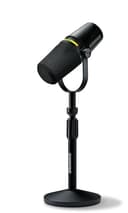 Shure MV7+ The mic that fixes bad rooms, in its current form. The same forgiving dynamic capsule that made the original MV7 the default podcast mic, now with USB-C, onboard digital processing and a real-time denoiser. Shure has discontinued the original MV7, so this is the MV7 you buy new today. | Buy this first | $319.00 · View on Amazon Price as of October 27, 2026. #ad How we’re funded |
| 2 | 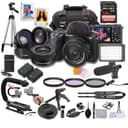 Sony ZV-E10 II The step-up ZV-E10: a newer 26 MP sensor and, crucially, uncropped 4K60 that the original could not do. If your budget stretches and you shoot fast-moving video, it earns the premium; if you are starting out, the original ZV-E10 still does the job for less. | Best camera to add second | $1,298.00 · View on Amazon Price as of October 27, 2026. #ad How we’re funded |
| 3 | 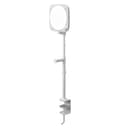 Elgato Key Light Neo The streamer's key light, made simple. Elgato's Key Light Neo is an edge-lit panel you control from software on your PC or phone — no reaching behind the light to adjust it mid-stream. The soft, diffused output is flattering, and it clamps neatly to a desk. It is about convenience and integration, not raw power. | Best light for a desk studio | $89.98 · View on Amazon Price as of October 27, 2026. #ad How we’re funded |
Lighting a seated shot, if the show is video
A podcast is the easiest lighting job there is, because your subject is seated, barely moves, and the camera does not move either. That means you can set the light precisely once and it stays right for an hour.
One light at roughly 45 degrees to the side the host is facing, raised a little above eye level and angled down, does most of the work. A second, weaker source on the opposite side stops the shadow side of the face going black. For two people at a table, place one light on each side, between and slightly camera-side of the pair — each light becomes the other person’s fill. The three-point lighting explainer lays out the full arrangement, and our interview lighting roundup ranks the fixtures.
For a desk-based show, a software-controlled panel on a desk clamp is the practical choice over a floor stand, for the same reason it is on a stream: the floor stays clear and you can change the light without standing up. If the room has a usable window, use it as your key and turn the overheads off — but be aware that daylight changes over a two-hour recording and your footage will shift with it.
Where to put the camera
At eye level, not above and not below. A camera looking down at a seated host is the most common mistake in home video podcasts, and it is purely a tripod height problem.
Frame reasonably tight on one host — head and shoulders with a little space above the head. For two people at a table, you need roughly a 24mm equivalent field of view from about eight feet back, and you should shoot around f/4 rather than wide open so both faces stay in focus. Our podcast camera roundup covers the bodies and the record-limit question that decides between them, and depth of field explained has the arithmetic on why f/1.8 will not hold two faces.
Keep the background honest. A bookshelf, a plant, a lamp left on behind the subject — anything that puts some depth behind them. A bare wall two feet behind a host is what makes a shot look like a hostage video, and a light on that wall fixes it more cheaply than a new camera does.
What to skip
Thin acoustic foam. Those 1-inch tiles absorb high frequencies and leave the low-mid reflections that make a voice sound boxy. A duvet does more. If you later want real treatment, thick broadband panels are what work, and they are a different product entirely.
A mixer, at first. Two USB microphones recorded to separate tracks in software handles almost every two-host show. A mixer or interface becomes worth buying when you have three or more XLR mics or you are going out live.
A second camera, at first. One wide shot of two people at a table is a perfectly good podcast. The second angle is an editing convenience, and it is the right purchase after you have discovered that editing a 90-minute conversation into 45 minutes is the actual work.
Recording video before the audio is right. Nobody has ever stopped listening to a podcast because of the picture. Plenty stop because of the sound.
A sensible first recording session
- Close the windows, switch off the air conditioning, the fan and anything with a compressor in it.
- Sit down and clap once. If you hear a ring, add something soft in front of you and clap again.
- Set your levels while talking at your loudest, aiming for peaks well below clipping.
- Put headphones on. Everyone. Record ten seconds, play it back, and listen for anything that is not a voice.
- Record the episode. Record each host to their own track.
- Before anyone stands up, record thirty seconds of silence as room tone.
That sequence, with one microphone per host and nothing else, produces a publishable podcast. Everything else on this page is an improvement to it, in roughly the order worth making them.
Frequently asked questions
What do I need to set up a podcast studio at home?
A small, soft room; one good microphone per host; headphones for everyone; and recording software. That is a publishable podcast. A camera and a light are the next purchases if the show is video, and they come after the audio is right, not before.
What is the best room for a home podcast?
The smallest, softest room you have. Carpet, curtains, a bed, a full bookshelf and a wardrobe of clothes all absorb reflections, which is why a spare bedroom beats a kitchen or a converted garage. High ceilings, bare walls and hard floors are what make a room sound like a room.
How much does a home podcast studio cost?
A one-host audio setup is one microphone and a pair of headphones. Add a second microphone for a guest, then a camera and a light if the show is video. Spending in that order matters more than the total — a cheap mic in a treated room beats an expensive mic in a bad one.
Do I need acoustic foam for a podcast?
Rarely. Thin foam tiles absorb high frequencies and do little about the low-mid reflections that make a voice sound boxy. Soft furnishings, a rug, curtains and a full bookshelf do more for nothing, and getting the microphone closer to your mouth does more than all of it.
Which wall should I treat first in a podcast room?
The wall you are facing, because the reflection that reaches the microphone is the one bouncing off the surface in front of your mouth. A duvet, a heavy curtain or a full bookshelf on that wall is the first and cheapest improvement available.
Should each podcast host have their own microphone?
Yes, if you can. One mic per host, recorded to its own track, means you can fix one person's level, cough or chair squeak without touching the other. Two people sharing one microphone works, but every problem then belongs to both of you permanently.
Do I need a mixer for a home podcast?
No. Two USB microphones recorded into software on separate tracks covers nearly every two-host show. A mixer or interface earns its place when you have three or more XLR microphones, want hardware processing, or are broadcasting live with no edit to fix things in.
Sources
- Shure — Official microphone specifications — Shure's official mic spec pages (accessed July 18, 2026)
- Sony — Official camera specifications — Sony's official Alpha and ZV camera spec pages (accessed July 18, 2026)
- Elgato — Official product specifications — Elgato official spec pages for lighting, webcams and capture cards (accessed July 18, 2026)
Keep reading
Best Cameras for Podcasting
Bodies ranked on record limits, battery life and two-camera cost.
See podcast camerasBest USB Microphones
The one purchase that changes a podcast most, ranked.
See USB micsBest Lights for Interviews
Two chairs, one camera — how to light a seated conversation.
See interview lightsHow to Record Audio for Video
Levels, monitoring, room tone and syncing separate sound.
Read the guide