If your room is the problem: go dynamic
This is the upgrade most people searching for a Yeti alternative actually want, even if they would not phrase it that way. A condenser capsule is sensitive by design and picks up sound arriving from a wide area. A dynamic capsule needs more sound pressure to move, which in practice means it captures the voice six inches in front of it and drops off sharply for everything further away. The room does not disappear; it gets quieter relative to you, which is the whole game.
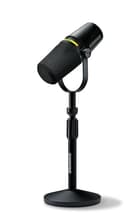
The Shure MV7+ is the one to buy. It carries the same forgiving dynamic capsule that made the original MV7 the default podcast microphone, now over USB-C with onboard DSP and a real-time denoiser, and it still offers XLR if you later add an interface. Our dynamic versus condenser explainer covers why the difference is so much larger than the spec sheet suggests.
Two honest costs. It is markedly more expensive than a Yeti, so this is an upgrade rather than a sideways move. And a dynamic mic wants close, on-axis placement to sound its best — back off to arm’s length and it goes thin, where a condenser would still sound full. If you cannot or will not keep the mic near your mouth, a dynamic is the wrong fix.
If your room is already fine: a cleaner condenser
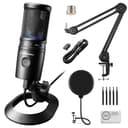
If you record somewhere soft and quiet, you do not need to leave the condenser category at all — you just want a better one. The Audio-Technica AT2020USB-X puts a studio-staple capsule behind a USB connection and adds a headphone jack, on-mic mute and a monitor mix control, with none of the lighting or styling. It is the choice for voiceover and narration where you want the recording to sound like the room you built and nothing else.
It is a condenser, so it inherits the Yeti’s sensitivity — this is not the pick if the room is the problem. It also has no stand upgrade in the box and really wants a boom arm, which is a real extra cost to plan for. And it is cardioid only: if you were using the Yeti’s bidirectional or stereo modes, that flexibility is a genuine thing you would be giving up, and it is worth checking you actually used it. Our polar patterns explainer sets out what each mode is for.
If you want the tidiest desk: an all-in-one
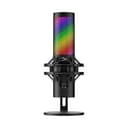
The HyperX QuadCast 2 S is the closest like-for-like swap on this page. It keeps four pickup patterns and headphone monitoring, and it adds the two things people bolt onto a Yeti afterwards: a shock mount and a pop filter, both built in. A tap-to-mute top is faster than hunting for a switch mid-call, and the whole thing takes up less desk than a Yeti on its stand.
The trade is that it is still a condenser, so a noisy room is still a noisy room, and the RGB lighting is either a feature or an irritation depending on the desk it lands on. If you are lighting that desk too, our streaming lighting guide covers the other half of the setup.
If the mic should not be on the desk at all
Two picks here are not desk microphones, and they are on this page deliberately, because a surprising share of people who outgrow a Yeti actually need the mic somewhere else.
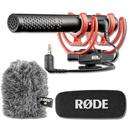
The RODE VideoMic NTG is a broadcast-grade shotgun that is also a full USB microphone with headphone monitoring through its 3.5mm jack. On a boom arm it stays out of frame while you are on camera, and the same mic unclips onto a camera when you go out to film. It brings controls a Yeti does not have — an infinitely variable gain dial, a high-pass filter, a −20 dB pad and a safety channel that records a second quieter copy in case you clip. It is the most expensive thing here and the only live US listing is a bundle with a windshield, so you pay for an accessory you may not need.
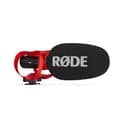
The RODE VideoMic GO II is the budget pick and the only pick that undercuts the Yeti on price. It works as a USB microphone into a computer or a 3.5mm microphone on a camera, needs no battery, and its tight directional pattern pushes the room back — the same benefit a dynamic gives you, arrived at by aiming rather than by capsule type. What you give up is blunt: no controls on the mic at all, no headphone output, and no safety channel, so a sudden loud moment can clip with nothing to catch it. USB use also needs a cable RODE sells separately.
What none of these fix
A microphone cannot undo a room. If your recordings sound hollow or echoey, the cheapest real improvement is still soft furniture and proximity: get the capsule within a hand’s width of your mouth, and put a rug, a sofa or a closed curtain between you and the nearest bare wall. Every pick here sounds better after that, and so does a Yeti.
A second thing worth setting expectations on: none of these will make a noticeable difference to a listener on a video call, because the platform compresses the audio heavily either way. If calls are the use case, read our Zoom call microphone picks instead, which rank for exactly that and name the setting that undoes most of the benefit.
How we compared these
Against the Yeti’s own published strengths, in this order: how much of the room the capsule rejects; pickup-pattern flexibility, since four patterns is one of the Yeti’s real advantages; onboard controls and headphone monitoring; desk footprint and what else you have to buy; and price, where we say plainly that only one pick here is cheaper. We have not tested these microphones — here is exactly what we do instead— and every specification quoted is the manufacturer’s own published figure with the date it was read. There are no scores on this page, because a score would imply a measurement we did not take.