Wide Open. Gear

The Best Microphone for Zoom Calls

The mics that make you the easiest person on the call to listen to — and the one setting in Zoom that undoes most of the benefit.

By Stephen V.Last updated How we pick

For most people on calls all day, the Audio-Technica AT2020USB-X is the one to buy — a cardioid USB condenser with a headphone jack, a mute button and a monitor-mix dial on the body, and no software layer between you and it. It sounds clean, it looks like nothing, and the controls you need mid-meeting are under your hand. If the budget is the deciding factor, the Blue Yetiis still a fair buy and its extra pickup patterns cover two people at one desk. If your room is noisy — an open-plan office, a kitchen, a street-facing window — the dynamic Shure MV7+ is the pick, because it rejects what is around you in a way condensers cannot. And if you want one-tap muting and a mic that needs nothing else on the desk, the HyperX QuadCast 2 S has a shock mount and pop filter already built in.

Before you spend anything, understand what you are buying, because it is not “better sound quality” in the way a music recording would mean it. Zoom compresses your audio heavily; nobody on the call hears studio detail. What a real microphone buys you on a call is intelligibility: your voice arrives louder relative to your room, so the platform’s noise suppression has less to fight, and you stop sounding like you are at the far end of a tiled corridor. That is a genuine difference in how tiring you are to listen to for an hour, and it is almost entirely a function of how close the mic is to your mouth and how much of the room it hears.

Which is why the single most important specification here is the pickup pattern, not the price. A cardioid mic hears what is in front of it and rejects what is behind, so it wants to be six to twelve inches from your mouth, slightly off to one side, pointed at you. Every pick below is cardioid-capable; the differences are whether it is a condenser (more detail, hears more room) or a dynamic (less detail, hears much less room), and what controls sit on the body for muting and monitoring.

How this is funded:we earn a commission if you buy through our links, at no extra cost to you. It never changes which product we recommend, and we’ll tell you plainly when to skip one. Full disclosure.

Quick picks

Ranked on published specs and buyer fit. Select a row to jump to the full write-up. We have not tested these products — here is exactly what we do instead.

#ProductBest forPrice
1
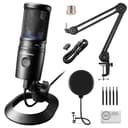
Audio-Technica AT2020USB-X

Audio-Technica AT2020USB-X

The quiet, no-nonsense USB condenser for people who just want clean sound. The AT2020 is a studio staple, and the USB-X version adds a headphone jack, on-mic mute and mix control without the hype or the RGB. It sounds excellent in a treated room and gets out of your way.

Best overall
$185.90 · View on Amazon

Price as of October 10, 2026. #ad How we’re funded

2
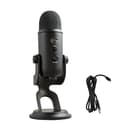
Blue Yeti USB Microphone

Blue Yeti USB Microphone

The USB mic everyone knows, and still a fair pick for its price and its four pickup patterns. The catch is that it is a sensitive condenser that hears everything — keyboard, room, the street. In a quiet space it sounds great; in a noisy one, a dynamic mic like the Shure MV7 will treat you better.

Best value
$98.99 · View on Amazon

$139.9929% off

Price as of October 10, 2026. #ad How we’re funded

3
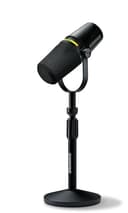
Shure MV7+

Shure MV7+

The mic that fixes bad rooms, in its current form. The same forgiving dynamic capsule that made the original MV7 the default podcast mic, now with USB-C, onboard digital processing and a real-time denoiser. Shure has discontinued the original MV7, so this is the MV7 you buy new today.

Best for a noisy room
4
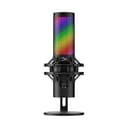
HyperX QuadCast 2 S

HyperX QuadCast 2 S

The streamer's USB condenser, with the RGB to match. A tap-to-mute top, a built-in shock mount and pop filter, and four pickup patterns make it a genuinely convenient all-in-one. It is a condenser, so it likes a quieter room — but for a gaming desk it is one of the tidiest packages going.

Best for one-tap mute
$149.99 · View on Amazon

$199.9925% off

Price as of October 10, 2026. #ad How we’re funded

The picks in full

#1Best overall

Audio-Technica AT2020USB-X

The quiet, no-nonsense USB condenser for people who just want clean sound. The AT2020 is a studio staple, and the USB-X version adds a headphone jack, on-mic mute and mix control without the hype or the RGB. It sounds excellent in a treated room and gets out of your way.

Strengths

  • Trusted studio capsule with a clean, natural sound
  • Headphone jack, mute and monitor mix on the mic
  • Understated design — no lights, no gimmicks

Trade-offs

  • Condenser needs a quiet, treated space
  • No stand upgrade in the box; wants a boom arm
TypeUSB condenser
PatternCardioid
MonitoringHeadphone output with mix control
ConnectionUSB-C

Specifications read from the manufacturer listing, on July 18, 2026.

#2Best value

Blue Yeti USB Microphone

The USB mic everyone knows, and still a fair pick for its price and its four pickup patterns. The catch is that it is a sensitive condenser that hears everything — keyboard, room, the street. In a quiet space it sounds great; in a noisy one, a dynamic mic like the Shure MV7 will treat you better.

Strengths

  • Four pickup patterns for solo, duet or room recording
  • Plug-and-play with on-mic gain, mute and monitoring
  • Widely supported and often discounted

Trade-offs

  • Sensitive condenser picks up room and keyboard noise
  • Large and heavy on its included stand
TypeUSB condenser
PatternsCardioid, omni, bidirectional, stereo
MonitoringBuilt-in headphone output
ConnectionUSB

Specifications read from the manufacturer listing, on July 18, 2026.

#3Best for a noisy room

Shure MV7+

The mic that fixes bad rooms, in its current form. The same forgiving dynamic capsule that made the original MV7 the default podcast mic, now with USB-C, onboard digital processing and a real-time denoiser. Shure has discontinued the original MV7, so this is the MV7 you buy new today.

Strengths

  • Dynamic capsule rejects room echo and background noise
  • USB-C, real-time denoiser and onboard DSP
  • Customizable LED touch panel; still offers XLR

Trade-offs

  • Costs more than most USB condensers
  • Wants close, on-axis placement to sound its best
TypeDynamic (USB-C + XLR)
PatternCardioid
ProcessingOnboard DSP, real-time denoiser
ConnectionUSB-C and XLR

Specifications read from the manufacturer listing, on July 18, 2026.

#4Best for one-tap mute

HyperX QuadCast 2 S

The streamer's USB condenser, with the RGB to match. A tap-to-mute top, a built-in shock mount and pop filter, and four pickup patterns make it a genuinely convenient all-in-one. It is a condenser, so it likes a quieter room — but for a gaming desk it is one of the tidiest packages going.

Strengths

  • Built-in shock mount and pop filter — nothing extra to buy
  • Tap-to-mute top and four pickup patterns
  • USB-C with headphone monitoring

Trade-offs

  • Condenser sensitivity picks up a noisy room
  • RGB is not to everyone's taste
TypeUSB condenser
PatternsCardioid, omni, bidirectional, stereo
FeaturesTap-to-mute, built-in shock mount
ConnectionUSB-C

Specifications read from the manufacturer listing, on July 18, 2026.

Condenser or dynamic: pick by your room, not your budget

This is the decision that determines whether you are happy with the purchase.

A condenseris sensitive and detailed. In a quiet room with soft furnishings it sounds superb — natural, open, flattering. In a hard, empty, echoey room, or one with a mechanical keyboard, a dog, a fan or an open-plan office in it, that same sensitivity is working against you: it picks up everything, and Zoom’s noise suppression then chews at your voice trying to remove it. The AT2020USB-X, the Blue Yeti and the QuadCast 2 S are all condensers.

A dynamicmic is far less sensitive and much more directional in practice, so it hears mostly whatever is directly in front of it and very little else. That makes it the forgiving choice in a room you cannot treat, which is exactly why broadcasters use them. The trade is that you have to be close and on-axis for it to sound right — a dynamic mic a foot away sounds thin and distant. The MV7+ is the dynamic here, and it adds onboard processing and a real-time denoiser.

If you are unsure which your room is, clap once. If you hear a distinct ring or slap afterwards, buy the dynamic. Our dynamic vs condenser explainer goes further into why.

The Zoom settings that matter

A good mic badly configured sounds worse than a laptop. Three things to set once.

Select the mic explicitly.In Zoom’s audio settings, choose your microphone by name rather than leaving it on “Same as System”. A Bluetooth headset connecting, or a monitor with a built-in mic waking up, can silently take over the input and you will not notice until someone says they cannot hear you properly.

Turn off automatic level adjustment.Zoom’s automatic gain rides your volume up and down, which with a real mic means it quietly amplifies your room every time you stop talking. Uncheck it and set the input level yourself so your normal speaking voice peaks comfortably short of the top.

Set background noise suppression to the lowest setting that works. Aggressive suppression is designed to rescue a laptop mic in a cafe. Applied to a good cardioid mic in a normal room it removes the natural decay of your voice and makes you sound processed and clipped at the start of words. Start low; raise it only if something in your room genuinely intrudes.

Finally, use the headphone jack on whichever mic you buy. Hearing yourself in the mic’s own monitoring is how you notice you have drifted out of the sweet spot — and wearing headphones at all is what stops the other person’s voice coming out of your speakers and back into your mic as echo.

Placement: where the free improvement is

Put the mic six to twelve inches away, slightly off to one side of your mouth rather than directly in front of it, angled up at you. Off-axis placement avoids the blast of air from plosive sounds and keeps the capsule out of your eyeline so your face stays visible on camera — a mic in the middle of the frame is a trade-off people regret on video calls specifically.

Keep it off the desk surface if you can. A mic standing on a hard desk picks up every keystroke, mouse click and knock as structure-borne noise, which is both louder and harder to suppress than airborne sound. A boom arm solves it; a folded towel under the stand helps for free. The QuadCast 2 S is the pick here that includes a shock mount, which is the same fix built in.

Do you need a mic at all, or a better webcam?

Audio first, always. People will tolerate a soft, slightly grainy picture for an hour and will not tolerate audio they have to concentrate to parse — and on a call where everyone is a small rectangle, the picture matters less than it does on YouTube. Fix the mic, then the light, then the camera.

That said, the three compound. Once your audio is sorted, a key light does more for how you look on camera than a new webcam does, because most webcam noise is actually a dark room. See best key light for Zoom calls and then best webcams for video calls in that order.

And if the same microphone is going to pull a double shift for recording as well as meetings, read best USB microphones— the picks overlap, but the ranking changes once voiceover and podcasting are part of the job.
Frequently asked questions

What is the best microphone for Zoom calls?

The Audio-Technica AT2020USB-X for most people: a clean cardioid USB condenser with a mute button, a headphone jack and a monitor-mix dial on the body, and nothing to configure. In a noisy or echoey room, choose the dynamic Shure MV7+ instead, because it hears far less of the room.

Does a better microphone actually help on Zoom?

Yes, but not in the way you might expect. Zoom compresses audio heavily, so nobody hears studio detail. What a real mic gives you is your voice louder relative to your room, which makes you clearly easier to understand and much less tiring to listen to over an hour.

Should I use a USB microphone or a headset for calls?

A headset mic is always close to your mouth and hard to beat for pure intelligibility, so it is a genuinely good choice for calls only. A USB mic sounds more natural, keeps your head free of hardware on camera, and doubles as a recording microphone — which is why it is the better buy if you also make video.

How far should the microphone be from my mouth?

Six to twelve inches, slightly off to one side rather than straight in front, angled up toward you. Off-axis placement avoids plosive blasts and keeps the mic out of the middle of your video frame. A dynamic mic wants the closer end of that range.

Should I turn on Zoom's background noise suppression?

Use the lowest setting that handles your room. Aggressive suppression exists to rescue laptop mics in cafes, and applied to a good cardioid mic it strips the natural decay from your voice and clips the start of words. Also turn off automatic level adjustment and set your input level manually.

Is the Blue Yeti still a good mic for meetings?

For the money, yes — it is plug-and-play, has on-body gain, mute and monitoring, and its multiple pickup patterns cover two people sharing one desk, which no other pick here does as simply. The caveat is the one all condensers have: it is sensitive, so it wants a reasonably quiet room.

Will a USB mic work with Teams and Google Meet too?

Yes. Every mic here is a standard USB audio device, so Teams, Meet, Slack huddles and anything else see it the same way Zoom does. You will need to select it explicitly in each application's audio settings rather than trusting the system default.

Sources

Keep reading