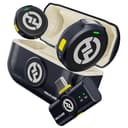
If you want the safety net without the menus: RODE Wireless GO (Gen 3)
This is the straight swap, and the one to buy if you are replacing a DJI kit rather than downgrading from one. It is the system that created this category, and the third generation added the feature that had been the main reason to choose DJI instead: 32-bit float recording onboard. That is worth explaining, because it is the single most useful thing either brand does. A 32-bit float file has so much headroom that a sudden shout which would have clipped into distortion on a normal recording can be pulled back down in editing and still sound clean. A ruined take from someone laughing into the microphone basically stops being a category of problem.
Two tiny transmitters clip to your subjects, the receiver mounts on the camera, and you are running clean wireless audio in seconds. It connects to a camera over 3.5mm and to a computer or phone over USB-C. The reason it is the overall pick rather than a tie is simplicity: there is less to configure than on the DJI, which matters when you are setting up in front of someone who is waiting.
Two honest costs. The transmitter’s built-in microphone is fine, not invisible— it clips on as a visible box rather than disappearing like a lavalier, so on a formal interview you will see it in frame. RODE’s own answer is to plug a separate lavalier into the transmitter, which works well and is an extra purchase to plan for. And it is the most expensive pick on this page, so this is a sideways move from a DJI Mic rather than a saving.
If price is the problem: Hollyland Lark M2
The Lark M2 is built around being unseen. Its transmitters are round, coin-sized clips that can also attach magnetically through fabric, which is a genuinely different physical idea from a clip-on box — and it undercuts both DJI and RODE on price while quoting range up to around 1,000 feet line of sight. For presenting, fashion, and anything where the mic must not be part of the shot, it is the pick on looks alone.
It is the cheapest wireless system here, and cheaper than the DJI Mic Mini as both read today, which makes it the honest answer to “I just want a cheap DJI Mic alternative”.
What you give up is the safety net: no 32-bit float recording. That puts it in the same bracket as the Mic Mini on that specific point — you set your levels correctly and you live with the result, which is how everyone recorded audio until recently and is perfectly workable if you check levels before you roll. The charging case also adds bulk to an otherwise tiny kit, which is mildly annoying given that the whole appeal is smallness.
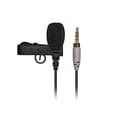
If you want to stop charging things: RODE smartLav+
A wired lavalier is the option almost nobody shopping for a wireless mic considers, and for a seated interview, a podcast, or a fixed talking-head setup it is often the better buy. It is a proper broadcast-style lav that plugs into a phone’s headphone jack or an adapter, and because it is wired there are no batteries, no pairing and no dropouts— three failure modes that simply cannot happen. It comes with a windshield and a mount clip, and it costs a fraction of any wireless kit.
The trade is the cable, and it is not a small one. You are tethered to the recorder, which rules out anything where the subject walks, stands up or turns away. It is one presenter per microphone, so a two-person interview needs two of them plus a way to record both. And many modern devices need an adapter, which is one more thing to own and lose. Our lavalier versus shotgun explainer walks through which of the two shapes fits which shoot.
If the camera is already close: an on-camera shotgun
Two picks here are not wireless at all, and this is the section that saves people the most money. If your camera sits two or three feet from your face — a desk setup, a tripod in a room, a product table — then the entire purpose of a radio link is to solve a problem you do not have. A directional on-camera microphone will get you most of the way to the same result for much less, with nothing to charge and nothing to pair.
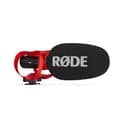
The RODE VideoMic GO II is the one to buy if you buy one. It works as a camera microphone over 3.5mm and as a USB microphone into a computer or phone, it needs no battery because the camera or the USB port powers it, and its tight directional pattern pushes the room back — the same benefit a clip-on lav gives you, arrived at by aiming rather than by proximity. What you give up is blunt: there are no controls on the microphone at all(gain, high-pass and pad are set in RODE’s app over USB), there is no safety channel, so a sudden loud moment can clip with nothing to catch it, and USB use needs a cable RODE sells separately.
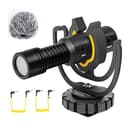
The Deity V-Mic D4 Mini is the budget pick and the cheapest thing on this page by a wide margin. It draws plug-in power straight from the camera’s microphone jack, its supercardioid pattern is tight, and its wind rejection is good for the money, which makes it a sensible cheap upgrade for talking to camera outdoors. Its limits: no headphone monitoring, no USB output, and it needs a device that actually supplies plug-in power — most mirrorless cameras and phones do, but a mixer or an audio interface generally does not.
What none of these fix
No microphone fixes placement. The single biggest improvement available to anyone reading this page is free: get the capsule closer to the mouth. A lav belongs about a hand’s width below the chin, on the sternum, not down on a jacket pocket; an on-camera shotgun wants the camera closer rather than the gain higher. Every pick here sounds better after that, and so does a DJI Mic.
None of them fixes a room, either. If recordings sound hollow or echoey, that is reflections off hard surfaces and a different microphone will faithfully record the same reflections. Soft furniture, a rug and a closed curtain do more than any upgrade on this page. Our guide to recording audio for video covers levels, placement and recording a separate audio track, which is where the real gains are once the microphone is adequate.
And none of them is a desk microphone. If you are recording a podcast or voiceover sitting at a computer, a clip-on wireless system is the wrong tool and a USB or XLR desk microphone is the right one — our Blue Yeti alternatives page covers that side of the problem.
How we compared these
Against the DJI Mic line’s own published strengths, in this order: whether the transmitter records its own backup, since 32-bit float is the feature that most changes the outcome of a shoot; how visible the transmitter is in frame, because DJI’s 16 g transmitter is a real advantage; how much setup you have to learn, where DJI’s own trade-off is more menus and modes than a simple system; whether radio is needed at all for your shoot; and price, where we say plainly which picks undercut a DJI Mic and which do not. We have not tested these microphones — here is exactly what we do instead— and every specification quoted is the manufacturer’s own published figure with the date it was read. There are no scores on this page, because a score would imply a measurement we did not take.