Wide Open. Gear

The Creator Audio Kit Under $200

What $200 actually buys in creator audio — the one mic to spend it on, the two-mic kits that fit, and the gear it is not enough for.

By Stephen V.Last updated How we pick

Two hundred dollars is a genuinely good audio budget, on one condition: you spend it on the way you actually record, rather than spreading it thin across every way you might. The single most common mistake at this level is buying a mediocre version of three different things. One good microphone that matches your setup will beat that combination every time, and it will still be in use in three years.

So the first question is not which mic, it is where does the sound happen. At a desk, into a computer? On top of a camera? On a person walking around? Each has a clear best answer under $200, and two of them can be combined inside the budget if you need to cover more than one. The picks below are ordered by how many people they suit, and the worked kits underneath show which pairs actually fit. Prices move — the live figure on each card is the one to plan against.

How this is funded:we earn a commission if you buy through our links, at no extra cost to you. It never changes which product we recommend, and we’ll tell you plainly when to skip one. Full disclosure.

Quick picks

Ranked on published specs and buyer fit. Select a row to jump to the full write-up. We have not tested these products — here is exactly what we do instead.

#ProductBest forPrice
1
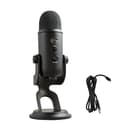
Blue Yeti USB Microphone

Blue Yeti USB Microphone

The USB mic everyone knows, and still a fair pick for its price and its four pickup patterns. The catch is that it is a sensitive condenser that hears everything — keyboard, room, the street. In a quiet space it sounds great; in a noisy one, a dynamic mic like the Shure MV7 will treat you better.

Best at a desk
$100.20 · View on Amazon

$139.9928% off

Price as of September 3, 2026. #ad How we’re funded

2
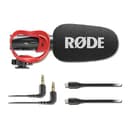
RODE VideoMic GO II

RODE VideoMic GO II

The best on-camera mic for most creators, and the one to buy if you buy one. It plugs into a camera by 3.5mm or straight into a computer or phone over USB, needs no battery, and sounds dramatically better than any built-in mic. Directional enough to reject room noise, simple enough to forget about.

Best on a camera
$94.99 · View on Amazon

$109.0013% off

Price as of September 3, 2026. #ad How we’re funded

3
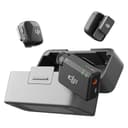
DJI Mic Mini (2 TX + RX)

DJI Mic Mini (2 TX + RX)

The wireless mic to buy if invisibility and price matter more than pro features. It is tiny — genuinely hard to spot clipped on a collar — with huge battery life and clean audio, for well under the Mic 2. You lose 32-bit float and some range, but for talking-head and interviews it is plenty.

Best on a person
$79.00 · View on Amazon

$99.0020% off

Price as of September 3, 2026. #ad How we’re funded

4
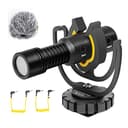
Deity V-Mic D4 Mini

Deity V-Mic D4 Mini

The value on-camera shotgun. It draws power straight from the camera's mic jack — no battery to forget — and delivers clean, directional sound for less than most rivals. A strong wind rating makes it a sensible cheap upgrade for outdoor talking-to-camera on a mirrorless or phone.

Cheapest real upgrade
$49.95 · View on Amazon

Price as of September 3, 2026. #ad How we’re funded

The picks in full

#1Best at a desk

Blue Yeti USB Microphone

The USB mic everyone knows, and still a fair pick for its price and its four pickup patterns. The catch is that it is a sensitive condenser that hears everything — keyboard, room, the street. In a quiet space it sounds great; in a noisy one, a dynamic mic like the Shure MV7 will treat you better.

Strengths

  • Four pickup patterns for solo, duet or room recording
  • Plug-and-play with on-mic gain, mute and monitoring
  • Widely supported and often discounted

Trade-offs

  • Sensitive condenser picks up room and keyboard noise
  • Large and heavy on its included stand
TypeUSB condenser
PatternsCardioid, omni, bidirectional, stereo
MonitoringBuilt-in headphone output
ConnectionUSB

Specifications read from the manufacturer listing, on July 18, 2026.

#2Best on a camera

RODE VideoMic GO II

The best on-camera mic for most creators, and the one to buy if you buy one. It plugs into a camera by 3.5mm or straight into a computer or phone over USB, needs no battery, and sounds dramatically better than any built-in mic. Directional enough to reject room noise, simple enough to forget about.

Strengths

  • Works as both a camera mic (3.5mm) and a USB mic
  • No battery — powered by the camera or USB port
  • Tight directional pattern cuts room and side noise

Trade-offs

  • No headphone monitoring or on-mic gain controls
  • Still picks up handling noise without a shock mount
TypeOn-camera shotgun (condenser)
Outputs3.5mm TRS and USB-C
PowerCamera or USB (no battery)
PatternSupercardioid (directional)

Specifications read from the manufacturer listing, on July 18, 2026.

#3Best on a person

DJI Mic Mini (2 TX + RX)

The wireless mic to buy if invisibility and price matter more than pro features. It is tiny — genuinely hard to spot clipped on a collar — with huge battery life and clean audio, for well under the Mic 2. You lose 32-bit float and some range, but for talking-head and interviews it is plenty.

Strengths

  • Extremely small and light — nearly invisible on camera
  • Long battery life and simple, reliable operation
  • Well under the price of the Mic 2

Trade-offs

  • No 32-bit float; shorter range than the Mic 2
  • No onboard recording backup
TypeWireless clip-on system
Transmitters2 included, with charging case
BatteryUp to ~48h with the case
ConnectionCamera, USB-C, Bluetooth

Specifications read from the manufacturer listing, on July 18, 2026.

#4Cheapest real upgrade

Deity V-Mic D4 Mini

The value on-camera shotgun. It draws power straight from the camera's mic jack — no battery to forget — and delivers clean, directional sound for less than most rivals. A strong wind rating makes it a sensible cheap upgrade for outdoor talking-to-camera on a mirrorless or phone.

Strengths

  • Powered by the camera — no battery to charge or forget
  • Good wind rejection for the price
  • Very affordable for a directional shotgun

Trade-offs

  • No headphone monitoring or USB output
  • Needs a device that supplies plug-in power
TypeOn-camera shotgun (condenser)
Output3.5mm TRS/TRRS
PowerPlug-in power from camera (1-5V)
PatternSupercardioid

Specifications read from the manufacturer listing, on July 18, 2026.

Three kits that fit inside $200

The desk kit. One USB microphone, and you are done. If you record voiceover, podcasts, streams or anything else sitting in front of a computer, put the whole budget into the mic and nothing else. A good USB condenser at this price sounds dramatically better than any headset or webcam mic, monitors through its own headphone jack, and needs no interface. The leftover money is better spent on moving the mic closer to your mouth than on a second device.

The camera kit. One on-camera shotgun, and you are also done. It mounts to the hot shoe, draws power from the camera so there is nothing to charge, and turns unusable built-in audio into something you would publish. If your mic also has a USB output, it doubles as a desk mic for calls and voiceover, which is the quiet reason it is the pick that suits the most people here.

The do-everything kit.This is where the budget starts to bind, and where the two-mic combination makes sense: a cheap directional shotgun on the camera for pieces to camera, plus a small wireless pair for anyone who moves or stands away from it. Together they cover run-and-gun video and two-person interviews for roughly what one mid-range desk mic costs — check both live prices before you commit, because this pair sits close to the line.

What $200 is not enough for

It will not buy a dynamic broadcast microphone with the onboard processing that makes an untreated room sound treated — that is the under $500 kit. It will not buy a wireless system with 32-bit float recording, which is the feature that rescues a badly levelled take instead of forcing a re-shoot. And it will not buy a mic and an audio interface and headphones and a boom arm. Anyone selling you all four at this price is cutting something you will notice.

The good news is that none of those are what limits a beginner. Distance is. A cheap microphone six inches from your mouth beats an expensive one three feet away, in any room, every time.

Spend the next $50 here

Once the mic is chosen, the upgrades that actually change the recording are unglamorous. Closed-back headphones so you can hear a problem while it is happening. A way to get the mic closer — an arm, a stand, a clip. Something soft in the room: a rug, a curtain, a sofa against the wall you face. Each of those does more than the next tier of microphone, and none of them go obsolete. After that, the honest next step is lighting, not more audio.
Frequently asked questions

What is the best microphone under $200 for a creator?

It depends entirely on where you record. At a desk, a USB condenser with its own headphone output is the pick and you should spend the whole budget on it. On a camera, an on-camera shotgun that draws power from the camera is the pick. On a person who moves around, a small wireless clip-on pair. There is no single answer, which is why buying for your actual setup matters more than buying the highest-rated mic.

Should I buy one good mic or two cheap ones?

One good one, unless you genuinely record in two different ways every week. Two cheap mics means two compromises and two things to maintain, and the cheap version of each usually gets replaced within a year. The exception is the camera-plus-wireless pairing, where the two mics do genuinely different jobs that one mic cannot cover.

Do I need an audio interface at this budget?

No, and you should avoid needing one. A USB microphone is the whole signal chain in one device. Adding an XLR mic plus an interface at this price means spending half the budget on the interface, which buys you flexibility you will not use yet and costs you microphone quality you would hear immediately.

Is a USB mic good enough for YouTube?

Yes, for anything recorded at a desk. Plenty of large channels run a USB microphone. What separates good from bad at this level is not the connector, it is how close the mic is to your mouth and how reflective the room is — both of which are free to fix.

What about headphones — do I need them?

They are the best fifty dollars you can add after the mic. Monitoring lets you catch a dead cable, a clipped level or an air conditioner hum while you are recording, instead of discovering it in the edit when the take is gone. Closed-back is the type you want, because open-back leaks sound back into the microphone.

Can I add to this kit later without wasting money?

Yes, if you buy the mic that fits your main use case rather than a compromise. A camera shotgun with a USB output keeps working when you add a desk setup. A wireless pair keeps working when you upgrade the camera. What ages badly is the second-best version of something you already own.

Sources

Keep reading