How to Record Audio for Video
Four ways to get sound into a video - on-camera, clipped on, recorded separately or recorded at a desk - what each one is good at, and how to sync the ones that need it.
There is one rule in recording audio for video and everything else is a detail: get the microphone close to the sound. A $70 microphone six inches from a mouth will beat a $700 microphone six feet away, in every room, every time. Distance is what lets the room into the recording, and the room is what makes amateur video sound amateur.
That rule is also why the microphone built into your camera is unusable for anything except a sync reference. It is not that the capsule is bad — it is that it is bolted to the camera, which is wherever the shot needs it to be, which is almost never six inches from anyone’s mouth. Every option below is a different way of solving that one geometry problem.
The four ways to record sound for video
1. On-camera microphone. A shotgun mic in the camera’s hot shoe, cabled into the mic input. One device, no sync, nothing to charge, and a directional pattern that rejects a good deal of the room. It works as long as the camera is close to the subject — arm’s length vlogging, a piece to camera, a product on a table. Beyond about three feet it stops being enough, because the distance rule catches up with it.
2. Wireless clip-on (lavalier). A transmitter on the subject, a receiver on the camera. This is the answer whenever the camera needs to be further away than the microphone should be — which is most real shooting. The capsule sits six inches from the mouth regardless of where the camera is standing, and the audio still lands in the camera’s file, so there is nothing to sync.
3. Dual system (recorded separately). The sound goes to a recorder, an interface or a computer and the picture goes to the camera, and you align the two in the edit. This is what you do when the camera’s preamp is the weak link, when you have more microphones than the camera has inputs, or when the microphone you want to use is not a camera microphone at all.
4. Desk recording for narration. If the voice is a voiceover rather than a performance on camera, none of the above applies: you record into a computer at a desk, in a controlled position, and lay it over the picture. This is the highest-quality option available to anyone, because nothing about the shot constrains the microphone placement.
Which one your project needs
Talking to the camera, close. On-camera shotgun. Cheapest, fewest failure points.
Talking to the camera from across a room, or walking. Wireless clip-on. There is no second-best answer here.
An interview with two people. Two clip-ons, or one shotgun on a boom if you have someone to hold it. Our interview lighting roundup covers the picture side of the same setup.
Narration over b-roll, a tutorial, a video essay. Desk mic, recorded separately, no camera involved. Our b-roll guide covers the footage half.
Live streaming. Desk mic into the computer, because there is no edit in which to fix anything. See our streaming shotgun roundup for the hybrid options.
The three picks below cover the first, second and fourth of those cases from the registry, with live prices.
How this is funded:we earn a commission if you buy through our links, at no extra cost to you. It never changes which product we recommend, and we’ll tell you plainly when to skip one. Full disclosure.
Quick picks
Ranked on published specs and buyer fit. Select a row to jump to the full write-up. We have not tested these products — here is exactly what we do instead.
| # | Product | Best for | Price |
|---|---|---|---|
| 1 | 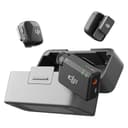 DJI Mic Mini (2 TX + RX) The wireless mic to buy if invisibility and price matter more than pro features. It is tiny — genuinely hard to spot clipped on a collar — with huge battery life and clean audio, for well under the Mic 2. You lose 32-bit float and some range, but for talking-head and interviews it is plenty. | Best for talking to camera | $95.00 · View on Amazon Price as of October 27, 2026. #ad How we’re funded |
| 2 | 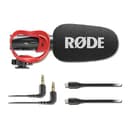 RODE VideoMic GO II The best on-camera mic for most creators, and the one to buy if you buy one. It plugs into a camera by 3.5mm or straight into a computer or phone over USB, needs no battery, and sounds dramatically better than any built-in mic. Directional enough to reject room noise, simple enough to forget about. | Best on-camera option | $119.99 · View on Amazon Price as of October 27, 2026. #ad How we’re funded |
| 3 | 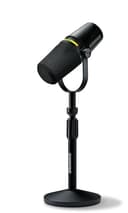 Shure MV7+ The mic that fixes bad rooms, in its current form. The same forgiving dynamic capsule that made the original MV7 the default podcast mic, now with USB-C, onboard digital processing and a real-time denoiser. Shure has discontinued the original MV7, so this is the MV7 you buy new today. | Best for voiceover at a desk | $319.00 · View on Amazon Price as of October 27, 2026. #ad How we’re funded |
Setting levels, and why headroom beats loudness
Set your levels while your subject is at their loudest, not while they are speaking calmly for the test. Aim for peaks somewhere around -12 to -6 dBFS and leave the rest alone. The reason is asymmetric risk: a recording that is slightly quiet can be raised in the edit at the cost of a little noise, while a recording that clipped has had its waveform flattened and no software recovers it.
If your mic offers a pad — the VideoMic NTG has a -20dB one, and most field mics have some equivalent — that is what it is for: a loud source close to the capsule. And if your camera has an automatic level setting, turn it off. Auto gain rides the level up during pauses, which is how you end up with a recording where the room breathes louder every time nobody is talking.
Monitor, or you are guessing
Plug headphones in and listen while you record. Not after — during. Almost every unrecoverable audio problem is silent on a level meter: a loose cable, a lav rubbing on a collar, a fridge that switched on, wind on a capsule, a transmitter that dropped out for four seconds. A meter tells you the signal exists; headphones tell you whether it is usable.
This is why headphone monitoring is worth treating as a required feature rather than a bonus. The VideoMic NTG’s 3.5mm jack doubles as a headphone output when it runs over USB; the MV7+ has monitoring built in; most cameras have a headphone jack even when they do not advertise it loudly.
Room tone: thirty seconds that saves an edit
At the end of every recording, ask everyone to stay still and silent, and record thirty seconds of nothing. That is room tone, and it is the single most useful thing you can capture that costs nothing.
You need it because silence in an edit is not silent — a hard cut from room sound to digital nothing is audible and amateurish. Room tone lets you patch gaps, cover edits and fill pauses with the same air the rest of the scene has. It cannot be recreated later, because the room will not sound identical tomorrow.
Syncing separately recorded sound
Always record a reference track on the camera, even when the real audio is going somewhere else. The camera’s built-in mic is terrible and that does not matter: it exists so your editing software can line up the waveforms automatically, which every current editor does well.
Clap once at the start of each take anyway. It takes a second, it gives the automatic matcher an unambiguous spike, and when the automatic match fails — usually because the camera mic heard mostly room — it gives you something to align by eye. The old-fashioned reason for a clapperboard is still the correct one.
Fixing the three problems you will actually have
Echo. The mic is too far away. Move it closer before you buy anything. Then soften the surface the sound bounces off — a rug, a curtain, a sofa, a full bookshelf. See our home studio guide for which wall to treat first.
Hiss. You turned the gain up because the mic is too far away or too insensitive for your voice. A dynamic mic on a weak camera preamp is the classic cause. Either get closer, or move the mic to a USB connection where a better preamp is doing the work.
Clothing rustle on a lavalier. The capsule is touching fabric. Clip it on the outside of a collar, make a small loop in the cable so the mic is not pulled against anything, and tape the cable to skin rather than to the shirt.
If none of that is enough, the problem is probably the microphone type rather than the technique — and our voice-over microphone roundup and polar patterns explainer cover how to change it.
Frequently asked questions
How do I record good audio for video?
Get a microphone close to the sound. Distance is the single biggest factor in how a recording sounds — a cheap mic six inches from a mouth beats an expensive one six feet away, every time. After that: set levels so peaks land well below clipping, monitor with headphones, and record thirty seconds of room tone.
Should I record audio separately from video?
Record separately when the microphone cannot be near the camera, when you need better quality than the camera's preamp provides, or when there is more than one speaker. For a single person talking to a camera a few feet away, a wireless clip-on recorded straight into the camera is simpler and syncs itself.
How do I sync separately recorded audio to video?
Always record a scratch track on the camera too, then let your editing software align the two waveforms automatically — every current editor can do this. A clap at the start of each take gives both the software and you a visible spike to align to if the automatic match fails.
What microphone should I use for talking to camera?
A wireless clip-on, if the camera is more than about three feet away. It puts the capsule six inches from your mouth regardless of where the camera is, which solves the distance problem that no on-camera mic can. An on-camera shotgun is the simpler, cheaper choice when you are close to the lens.
What should my audio levels be when recording video?
Aim for your loudest moments to peak somewhere around -12 to -6 dBFS, so there is headroom for a sudden laugh or a raised voice. Digital clipping is unrecoverable, while a recording that is a little quiet can be brought up in the edit. Set levels while the subject speaks at their loudest, not their calmest.
Why does my video audio sound echoey?
The microphone is too far from the speaker, so the room's reflections arrive at a similar volume to the voice. Move the mic closer first. Then soften the surfaces the sound bounces off — a rug, a curtain, a sofa, a full bookshelf — and switch off anything with a fan.
Do I need an external recorder for video audio?
Not usually. Modern wireless systems record into the camera cleanly, and desk USB mics record into a computer. A separate recorder earns its place when you need multiple microphones, timecode, or inputs your camera does not have — not as a default upgrade.
Sources
- DJI — Official product specifications — DJI official spec pages for Osmo, Mic and drones (accessed July 18, 2026)
- RODE — Official microphone specifications — RODE's official mic spec pages (accessed July 18, 2026)
- Shure — Official microphone specifications — Shure's official mic spec pages (accessed July 18, 2026)
Keep reading
How to Choose a Microphone
The buying decision in order, from what you shoot to what you buy.
Read the guideBest Wireless Microphones for Creators
Clip-on systems ranked, for when the camera is far from the mouth.
See wireless micsBest Shotgun Microphones
On-camera mics, ranked on pattern, power and handling noise.
See shotgun micsLavalier vs Shotgun Mic
The two field options, compared head to head.
Read the explainer