Wide Open. Gear

The Best Monitors for Video Editing

Video needs wide gamut, a clean 4K timeline and one cable to a laptop - the panels that deliver all three, and the one that does not.

By Stephen V.Last updated How we pick

For video editing, the monitor to buy is the Dell UltraSharp U2725QE — a 27-inch 4K IPS Black panel at around 99% DCI-P3, factory calibrated, running at 120Hz with a Thunderbolt 4 hub that pushes 140W back down one cable to a laptop. It is for anyone cutting 4K footage on a MacBook or a Thunderbolt-equipped Windows laptop who wants one cable on the desk. The budget pick is the ASUS ProArt PA278CV, which is QHD rather than 4K and sRGB rather than wide gamut, but is factory calibrated to 100% sRGB with Delta-E under 2 and costs a fraction of the panels above it.

Video editing asks a monitor for different things than photo editing does, and the gap is wider than most buying guides admit. Photo work lives in sRGB and Adobe RGB and cares most about per-unit accuracy — a low Delta-E and even panel uniformity. Video work lives in Rec.709 for anything destined for the web and in DCI-P3 for HDR delivery, which means gamut coverage matters more than raw accuracy if your footage is ever going to be graded. That is why the ranking here is not the same as on our photo editing monitors page, and why the most accurate sRGB panel on this list is not at the top of it.

Three things decide a video monitor. Resolution: 4K on a 27-inch panel lets you watch a 4K timeline at or near 1:1 while still having room for a scope and a bin, which is the single biggest workflow improvement available. Gamut: wide DCI-P3 coverage is what lets you see what you are doing when you grade, and an sRGB-only panel will clip saturated color you cannot then judge. Connectivity: a Thunderbolt or USB-C hub with enough power delivery turns the monitor into a dock, which on a laptop-based edit bay is the difference between one cable and five.

Refresh rate is the honest fourth item. 120Hz is not a gaming feature here — it makes scrubbing a timeline and dragging clips feel smoother, and it lets you preview 50p and 60p footage without the judder a 60Hz panel introduces at certain frame rates. It is a nice-to-have, not a requirement.

How this is funded:we earn a commission if you buy through our links, at no extra cost to you. It never changes which product we recommend, and we’ll tell you plainly when to skip one. Full disclosure.

Quick picks

Ranked on published specs and buyer fit. Select a row to jump to the full write-up. We have not tested these products — here is exactly what we do instead.

#ProductBest forPrice
1
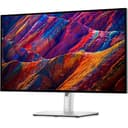
Dell UltraSharp U2725QE

Dell UltraSharp U2725QE

The editing monitor most people should buy. Dell's replacement for the long-serving U2723QE keeps the 27-inch 4K IPS Black panel and the deep blacks that come with it, then adds a 120Hz refresh rate, wider DCI-P3 coverage and a Thunderbolt 4 hub that charges a laptop over one cable. Factory-calibrated color, sharp text, and enough accuracy for serious photo and video work.

Best overall
$679.95 · View on Amazon

Price as of November 13, 2026. #ad How we’re funded

2
BenQ PD2705U

BenQ PD2705U

BenQ's designer monitor, tuned for people who care about accurate color out of the box. 4K, 99% sRGB and Rec.709 with factory calibration, plus a HotKey Puck for quick mode switching. It is aimed squarely at photo and video editors who want reliable, standards-based color rather than punchy contrast.

Best for Rec.709 delivery
$694.00 · View on Amazon

Price as of November 13, 2026. #ad How we’re funded

3
Dell UltraSharp U2723QE

Dell UltraSharp U2723QE

The editing monitor most people should buy. A 27-inch 4K IPS Black panel with wide color coverage, factory color accuracy and a genuinely useful USB-C hub that charges a laptop and runs peripherals over one cable. Deep blacks, sharp text and enough color accuracy for serious photo and video work.

Best previous-generation buy
$699.00 · View on Amazon

Price as of November 13, 2026. #ad How we’re funded

4
ASUS ProArt PA278CV

ASUS ProArt PA278CV

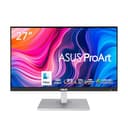
The best-value color-accurate monitor here. It is QHD rather than 4K, but it is factory-calibrated to 100% sRGB with Delta-E under 2, includes USB-C and daisy-chaining, and costs a fraction of the 4K panels. For a creator on a budget who still needs color they can trust, this is the smart pick.

Budget pick
$269.62 · View on Amazon

Price as of November 13, 2026. #ad How we’re funded

The picks in full

#1Best overall

Dell UltraSharp U2725QE

The editing monitor most people should buy. Dell's replacement for the long-serving U2723QE keeps the 27-inch 4K IPS Black panel and the deep blacks that come with it, then adds a 120Hz refresh rate, wider DCI-P3 coverage and a Thunderbolt 4 hub that charges a laptop over one cable. Factory-calibrated color, sharp text, and enough accuracy for serious photo and video work.

Strengths

  • IPS Black panel with noticeably deeper blacks
  • Around 99% DCI-P3 with factory-calibrated color
  • Thunderbolt 4 hub charges a laptop and runs peripherals on one cable

Trade-offs

  • Premium price versus basic 4K panels
  • 120Hz is smooth, but this is not a gaming panel
Size / resolution27-inch, 4K UHD (3840x2160)
PanelIPS Black, 120Hz
Color~99% DCI-P3, factory calibrated
ConnectivityThunderbolt 4 hub (140W), HDMI 2.1, DisplayPort, KVM

Specifications read from the manufacturer listing, on August 26, 2026.

#2Best for Rec.709 delivery

BenQ PD2705U

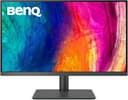
BenQ's designer monitor, tuned for people who care about accurate color out of the box. 4K, 99% sRGB and Rec.709 with factory calibration, plus a HotKey Puck for quick mode switching. It is aimed squarely at photo and video editors who want reliable, standards-based color rather than punchy contrast.

Strengths

  • Factory-calibrated 99% sRGB and Rec.709
  • 65W USB-C, KVM and a handy HotKey Puck
  • Even panel uniformity for editing

Trade-offs

  • sRGB-focused — less wide-gamut headroom than DCI-P3 panels
  • Design is functional, not flashy
Size / resolution27-inch, 4K UHD
Color99% sRGB / Rec.709, factory calibrated
HDRHDR10 support
ConnectivityUSB-C (65W), DisplayPort, HDMI, KVM

Specifications read from the manufacturer listing, on July 18, 2026.

#3Best previous-generation buy

Dell UltraSharp U2723QE

The editing monitor most people should buy. A 27-inch 4K IPS Black panel with wide color coverage, factory color accuracy and a genuinely useful USB-C hub that charges a laptop and runs peripherals over one cable. Deep blacks, sharp text and enough color accuracy for serious photo and video work.

Strengths

  • IPS Black panel with noticeably deeper blacks
  • Wide color gamut and good factory accuracy
  • USB-C hub charges a laptop and runs peripherals on one cable

Trade-offs

  • 60Hz — not for high-refresh gaming
  • Premium price versus basic 4K panels
Size / resolution27-inch, 4K UHD (3840x2160)
PanelIPS Black
Color~98% DCI-P3, factory calibrated
ConnectivityUSB-C hub (90W), DisplayPort, HDMI

Specifications read from the manufacturer listing, on July 18, 2026.

#4Budget pick

ASUS ProArt PA278CV

The best-value color-accurate monitor here. It is QHD rather than 4K, but it is factory-calibrated to 100% sRGB with Delta-E under 2, includes USB-C and daisy-chaining, and costs a fraction of the 4K panels. For a creator on a budget who still needs color they can trust, this is the smart pick.

Strengths

  • Factory-calibrated 100% sRGB, Delta-E < 2
  • USB-C, DisplayPort daisy-chaining and a USB hub
  • Much cheaper than the 4K editing panels

Trade-offs

  • QHD, not 4K — less sharp on a 27-inch panel
  • sRGB gamut only
Size / resolution27-inch, QHD (2560x1440)
Color100% sRGB, Delta-E < 2, Calman verified
ErgonomicsHeight/tilt/pivot adjustable
ConnectivityUSB-C, DisplayPort, HDMI, USB hub

Specifications read from the manufacturer listing, on July 18, 2026.

Why 4K on 27 inches is the sweet spot

A 4K timeline on a 4K monitor can be previewed at full resolution, which means you see the actual sharpness, grain and compression of your footage rather than a scaled-down approximation. On a 27-inch panel, 4K also gives you roughly 163 pixels per inch — sharp enough that interface text and timeline waveforms stay crisp, without needing the heavy scaling that a 4K 24-inch panel forces.

Bigger is not automatically better. A 32-inch 4K panel drops to around 138 ppi, which looks softer at normal desk distance, and a 27-inch QHD panel like the ProArt is around 109 ppi — perfectly usable, visibly less sharp. If your footage is mostly 1080p and your delivery is the web, QHD is a defensible saving. If you shoot 4K, buy 4K.

Rec.709, DCI-P3, and which one you actually need

Almost everything delivered to YouTube, a client or a broadcaster is Rec.709, which is for practical purposes the same gamut as sRGB. If that is all you ever deliver, the BenQ PD2705U’s factory-calibrated 99% sRGB and Rec.709 coverage is exactly the right tool, and its HotKey Puck for switching modes is genuinely useful on a grading desk.

DCI-P3 is a wider gamut used for HDR and cinema delivery. The two Dell panels cover around 98-99% of it, which gives you headroom to see saturated color that an sRGB panel simply cannot display — and if you cannot see it, you cannot judge whether you have pushed it too far. Our color space explainer covers the difference properly, and color grading basics for video covers what you do with it.

Whichever you buy, factory calibration drifts. A panel that was accurate when it shipped will not be accurate in two years, which is why calibrating your monitor is worth doing even on a factory-calibrated screen.

One cable: why the hub matters more than the panel

If you edit on a laptop, the monitor’s hub is the feature you will use every single day. The U2725QE’s Thunderbolt 4 hub delivers 140W, which is enough to charge a 14-inch MacBook Pro at full speed while carrying video, Ethernet and USB peripherals over the same cable. The older U2723QE does the same job over USB-C at 90W, and the BenQ at 65W — which is fine for a MacBook Air but will charge a larger laptop slowly under load.

Both Dells and the BenQ also include a KVM switch, which lets one keyboard and mouse control two connected machines. If you keep a desktop for rendering and a laptop for everything else, that is a real convenience. Check our video editing laptops page for which machines can take advantage of the higher power delivery, and portable SSDs for video if your media lives outside the laptop.

Where the budget pick stops being enough

The ProArt PA278CV is a genuinely good monitor and the wrong one for some people. Its limits are specific: QHD rather than 4K, so a 4K timeline is always scaled; sRGB gamut only, so HDR and P3 grading are off the table; and 60Hz, so timeline scrubbing is less fluid. What it keeps is the thing that matters most if your work is web delivery — 100% sRGB, Delta-E under 2, factory calibrated, with USB-C and daisy-chaining.

Put differently: if you cut 1080p and 4K footage for YouTube and never grade in HDR, the ProArt will not hold you back, and the money saved buys an SSD and a color calibrator. If you deliver graded or HDR work, it will.

How we ranked these

Resolution first, then gamut coverage against the standard you deliver in, then hub bandwidth and power delivery, then refresh rate, then panel contrast. We have not tested these monitors — here is what we do instead — and there are no scores on this page because a score would imply measurements we did not take. Every figure is the manufacturer’s own published specification with the date it was read; where a maker publishes a gamut figure as “approximately”, we repeat it that way rather than rounding it up.

Frequently asked questions

What monitor is best for video editing?

A 27-inch 4K panel with wide DCI-P3 coverage and a Thunderbolt or USB-C hub - on this page, the Dell UltraSharp U2725QE. 4K on 27 inches lets you preview a 4K timeline near 1:1, wide gamut lets you see saturated color when grading, and the hub turns the monitor into a one-cable dock for a laptop.

Is a 4K monitor necessary for video editing?

Not necessary, but it is the single biggest workflow improvement if you shoot 4K. A 4K panel shows 4K footage at full resolution so you judge real sharpness and compression rather than a scaled preview. If you shoot and deliver 1080p, a well-calibrated QHD panel like the ASUS ProArt PA278CV is enough.

Do I need DCI-P3 coverage or is sRGB enough?

sRGB is enough if everything you deliver is Rec.709 for the web, which covers most creators - the two gamuts are effectively the same. You need DCI-P3 if you grade for HDR or cinema delivery, because an sRGB panel physically cannot display the saturated color you are trying to judge.

Does refresh rate matter for video editing?

Mildly. A 120Hz panel makes scrubbing and dragging clips feel smoother and previews 50p and 60p footage without the judder a 60Hz panel can introduce. It is a comfort feature rather than a requirement - plenty of professional work is cut on 60Hz panels.

Can one monitor power my editing laptop?

Yes, if its power delivery is high enough for your machine. The Dell U2725QE's Thunderbolt 4 hub delivers 140W, enough for a 14-inch MacBook Pro at full speed; the older U2723QE does 90W over USB-C and the BenQ PD2705U does 65W, which suits a MacBook Air better than a power-hungry workstation laptop.

Sources

Keep reading