Wide Open. Gear

The Best Monitors for Photo Editing

Color-accurate 4K and QHD panels for photo and video work — what gamut coverage and factory calibration actually mean for your edits.

By Stephen V.Last updated How we pick

If your screen shows the wrong colors, you’re editing blind — your photos look different on everyone else’s device and your video grades wrong. A color-accurate monitor is the piece creators underrate most, and the good news is you don’t need the priciest reference display. You need one that’s honest about color.

Two specs matter above all: color gamut coverage(how much of a color space the screen can show — look for high sRGB coverage for web work, or DCI-P3 for video) and factory calibration (whether the maker tuned each panel for accuracy). Resolution matters too — 4K on a 27-inch panel is sharp — but accuracy beats pixels for editing. We’ve picked a 4K all-rounder, a color-focused designer panel, and a QHD value option.

How this is funded:we earn a commission if you buy through our links, at no extra cost to you. It never changes which product we recommend, and we’ll tell you plainly when to skip one. Full disclosure.

Quick picks

Ranked on published specs and buyer fit. Select a row to jump to the full write-up. We have not tested these products — here is exactly what we do instead.

#ProductBest forPrice
1
Dell UltraSharp U2723QE

Dell UltraSharp U2723QE

The editing monitor most people should buy. A 27-inch 4K IPS Black panel with wide color coverage, factory color accuracy and a genuinely useful USB-C hub that charges a laptop and runs peripherals over one cable. Deep blacks, sharp text and enough color accuracy for serious photo and video work.

Best overall
$658.09 · View on Amazon

Price as of July 28, 2026. #ad How we’re funded

2
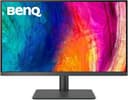
BenQ PD2705U

BenQ PD2705U

BenQ's designer monitor, tuned for people who care about accurate color out of the box. 4K, 99% sRGB and Rec.709 with factory calibration, plus a HotKey Puck for quick mode switching. It is aimed squarely at photo and video editors who want reliable, standards-based color rather than punchy contrast.

Best for color accuracy
$676.00 · View on Amazon

Price as of July 28, 2026. #ad How we’re funded

3
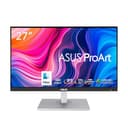
ASUS ProArt PA278CV

ASUS ProArt PA278CV

The best-value color-accurate monitor here. It is QHD rather than 4K, but it is factory-calibrated to 100% sRGB with Delta-E under 2, includes USB-C and daisy-chaining, and costs a fraction of the 4K panels. For a creator on a budget who still needs color they can trust, this is the smart pick.

Best value
$269.15 · View on Amazon

Price as of July 28, 2026. #ad How we’re funded

The picks in full

#1Best overall

Dell UltraSharp U2723QE

The editing monitor most people should buy. A 27-inch 4K IPS Black panel with wide color coverage, factory color accuracy and a genuinely useful USB-C hub that charges a laptop and runs peripherals over one cable. Deep blacks, sharp text and enough color accuracy for serious photo and video work.

Strengths

  • IPS Black panel with noticeably deeper blacks
  • Wide color gamut and good factory accuracy
  • USB-C hub charges a laptop and runs peripherals on one cable

Trade-offs

  • 60Hz — not for high-refresh gaming
  • Premium price versus basic 4K panels
Size / resolution27-inch, 4K UHD (3840x2160)
PanelIPS Black
Color~98% DCI-P3, factory calibrated
ConnectivityUSB-C hub (90W), DisplayPort, HDMI

Specifications read from the manufacturer listing, on July 18, 2026.

#2Best for color accuracy

BenQ PD2705U

BenQ's designer monitor, tuned for people who care about accurate color out of the box. 4K, 99% sRGB and Rec.709 with factory calibration, plus a HotKey Puck for quick mode switching. It is aimed squarely at photo and video editors who want reliable, standards-based color rather than punchy contrast.

Strengths

  • Factory-calibrated 99% sRGB and Rec.709
  • 65W USB-C, KVM and a handy HotKey Puck
  • Even panel uniformity for editing

Trade-offs

  • sRGB-focused — less wide-gamut headroom than DCI-P3 panels
  • Design is functional, not flashy
Size / resolution27-inch, 4K UHD
Color99% sRGB / Rec.709, factory calibrated
HDRHDR10 support
ConnectivityUSB-C (65W), DisplayPort, HDMI, KVM

Specifications read from the manufacturer listing, on July 18, 2026.

#3Best value

ASUS ProArt PA278CV

The best-value color-accurate monitor here. It is QHD rather than 4K, but it is factory-calibrated to 100% sRGB with Delta-E under 2, includes USB-C and daisy-chaining, and costs a fraction of the 4K panels. For a creator on a budget who still needs color they can trust, this is the smart pick.

Strengths

  • Factory-calibrated 100% sRGB, Delta-E < 2
  • USB-C, DisplayPort daisy-chaining and a USB hub
  • Much cheaper than the 4K editing panels

Trade-offs

  • QHD, not 4K — less sharp on a 27-inch panel
  • sRGB gamut only
Size / resolution27-inch, QHD (2560x1440)
Color100% sRGB, Delta-E < 2, Calman verified
ErgonomicsHeight/tilt/pivot adjustable
ConnectivityUSB-C, DisplayPort, HDMI, USB hub

Specifications read from the manufacturer listing, on July 18, 2026.

What actually matters in an editing monitor

Accuracy first, resolution second. A factory-calibrated panel with high sRGB (or DCI-P3, for video) coverage shows you the true colors of your work. A USB-C connection that charges your laptop and runs peripherals over one cable is a genuine quality-of-life upgrade if you edit on a laptop. And an IPS panel gives you consistent color from any viewing angle.

You don’t need a $2,000 reference monitor to edit well. The picks here deliver honest color at sensible prices. Pair one with a capable editing laptop and fast storage, and your whole workflow — from the camerato the export — stays honest and fast.

Frequently asked questions

Do I need a 4K monitor for photo editing?

4K is sharper and gives more working space, but color accuracy matters more than resolution for editing. A well-calibrated QHD panel like the ASUS ProArt is a better editing tool than an inaccurate 4K one. Buy accuracy first, resolution second.

What is color gamut and why does it matter?

Color gamut is the range of colors a screen can display. For web and photo work, look for high sRGB coverage (95-100%); for video, DCI-P3 coverage matters. A screen that can't show the full range makes your colors look different everywhere else.

What does factory calibration mean?

The manufacturer measured and tuned each panel for accurate color before shipping, often including a report. It means the monitor shows correct colors out of the box without you buying a calibration device — a real convenience for editors.

Why is USB-C useful on an editing monitor?

A single USB-C cable can carry the video signal, charge your laptop, and connect peripherals (a hub). For laptop-based editing that's a big quality-of-life gain — one cable instead of a charger, a video cable and a USB hub.

IPS, VA or OLED for editing?

IPS is the standard for editing — consistent color from any angle and good accuracy. The picks here are IPS. OLED offers deeper blacks and is excellent for video grading but costs more and carries a small burn-in risk with static editing interfaces.

Sources

Keep reading