How to Look Good on Camera
Camera height, lens distance and one well-placed light do more than anything you can buy. The fixes that work, in the order they matter.
Almost everything that makes people look bad on camera comes down to three things, and only one of them involves buying anything: the camera is too low, the lens is too close, and the light is in the wrong place. Fix those in that order and you will look better on a laptop webcam than most people do on a mirrorless camera.
It is worth saying plainly why the problem exists. You are used to seeing your face in a mirror, from eye level, at arm’s length, lit by whatever is in the room. A webcam shows you something different: a wide lens, placed low, under an overhead light, rendered flat. The gap between those two images is not your face, it is the optics and the lighting — and both are adjustable.
1. Camera height: eye level, always
A camera below your eye line looks up at you. That shortens the forehead, widens the jaw, adds apparent weight under the chin and shows the ceiling behind you. It is the default state of every laptop on every desk, and it is the single most common reason people dislike how they look on calls.
Put the camera at eye level or very slightly above it. For a laptop, that means raising the whole machine — a stack of books is a perfectly respectable solution and costs nothing. For a webcam, clamp it to the top of the monitor and raise the monitor if you have to. Slightly above eye level is flattering; below it never is.
2. Distance and focal length: back up, then zoom in
A wide lens close to your face enlarges whatever is nearest it, which is your nose, and compresses what is further away, which is your ears. That is the selfie look, and it is geometry rather than a quality problem — an expensive camera used the same way does the same thing.
The fix is to move the camera further away and narrow the frame. On a real camera, that means a longer lens: roughly 50mm or more on full-frame, 35mm or more on APS-C, used from four or five feet rather than two. On a webcam, it means reducing the field of view in the software and sitting at arm’s length rather than leaning in. The focal length explainer covers why this works, and crop factor explained covers the equivalence.
3. Light: one source, off to one side, above your eyes
An overhead ceiling light puts your eyes in shadow and lights the top of your head. A light directly in front of you flattens your features into a mask. A light from below looks theatrical. The flattering position is narrow and consistent: 30 to 45 degrees off to one side of the camera, raised above your eye line, angled down at you.
Bigger and closer is softer. A large source close to your face wraps around it and softens the shadow edges; a small source far away produces hard-edged shadows that emphasise every line. That is the entire reason softboxes exist. For a desk, a panel or ring at 12 inches or more, placed a couple of feet away and to one side, is the practical version.
Two things to avoid. Do not sit with a bright window behind you — the camera exposes for the window and makes you a silhouette; turn around and use the window as your light instead. And do not mix a warm lamp with a daylight-balanced panel: one cheek goes orange, the other blue, and no camera setting fixes both. Our white balance explainer covers why.
If you wear glasses, the light position is the whole game — raise it higher and angle it down more steeply so the reflection bounces below the lens rather than into it. Our lighting for glasses roundup deals with this properly.
Then, and only then, the gear
With the camera at eye level, the distance right and one light placed well, the remaining variable is the quality of the light and the camera. These three are the registry picks for that job, with live prices.
How this is funded:we earn a commission if you buy through our links, at no extra cost to you. It never changes which product we recommend, and we’ll tell you plainly when to skip one. Full disclosure.
Quick picks
Ranked on published specs and buyer fit. Select a row to jump to the full write-up. We have not tested these products — here is exactly what we do instead.
| # | Product | Best for | Price |
|---|---|---|---|
| 1 | 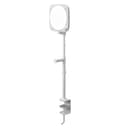 Elgato Key Light Neo The streamer's key light, made simple. Elgato's Key Light Neo is an edge-lit panel you control from software on your PC or phone — no reaching behind the light to adjust it mid-stream. The soft, diffused output is flattering, and it clamps neatly to a desk. It is about convenience and integration, not raw power. | Best desk light | $89.98 · View on Amazon Price as of October 27, 2026. #ad How we’re funded |
| 2 | 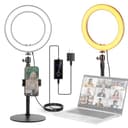 Neewer 12-inch Desktop Ring Light (RH12B) The desk ring light for anyone who lives on video calls. A 12-inch ring on an adjustable desk stand with a high CRI rating, so skin tones look right. It is the tidy, permanent option that sits by your monitor rather than the tall stand you keep tripping over. | Best for color accuracy | $61.89 · View on Amazon Price as of October 27, 2026. #ad How we’re funded |
| 3 | 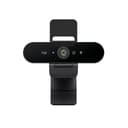 Logitech Brio 4K The webcam to buy when a real camera is overkill but a laptop cam is embarrassing. 4K capture, HDR that handles a bright window behind you, and Windows Hello face login. It is the top of the plug-and-play webcam world — beyond it, you are into mirrorless-as-webcam territory. | Best webcam upgrade | $169.99 · View on Amazon Price as of October 27, 2026. #ad How we’re funded |
Why the picks are what they are
Elgato Key Light Neo — an edge-lit panel with a desk clamp and bi-color control from 2900–7000K, adjustable from software on the PC or a phone. The software control is the point: a light you can change without standing up is a light you will actually keep correct as the daylight in your room moves.
Neewer 12-inch Desktop Ring Light — the pick when skin tone is what you care about. It publishes CRI 97+ / TLCI 98+ and runs 2900–7000K on an adjustable 11-18 inch desk stand, so it sits by the monitor rather than on a floor tripod you trip over. Place it off to one side rather than dead-on, for the reasons above.
Logitech Brio 4K — only relevant if the camera itself is the limiting factor. 4K capture with HDR handles the bright window behind you that defeats a laptop camera, and the field of view is adjustable, which lets you narrow the frame instead of showing the whole room. It is still a small-sensor webcam — a real camera looks better — but it is the top of the plug-and-play tier.
The background, and the depth problem
A webcam at desk distance renders you and the wall two feet behind you at nearly the same brightness, so you merge into it. There are three fixes and they all work.
Move further from the wall. Even three feet helps, because light falls off with distance and the wall goes darker than you do.
Put something behind you with depth. A bookshelf, a plant, a lamp left on. Not clutter — one or two things at different distances.
Light the wall separately. A second light aimed at the background, not at your back, is what makes a shot look designed rather than merely lit. Our streaming lighting roundup covers this as a buying order.
Avoid virtual backgrounds and heavy background blur if you have any choice. Software segmentation gets the edges of hair and glasses wrong, and a flickering halo around your head is more distracting than a plain wall ever was.
Clothes, shine and the small things
Wear mid-tones, solid. Pure white blows out under a key light and pure black loses all shadow detail. Tight stripes and small checks can shimmer against video compression. And check your top against your background: a gray shirt in front of a gray wall removes your shoulders.
Deal with shine. A bright light on skin produces a highlight on the forehead and nose that reads as sweat on camera. Softening the light helps, moving it further away helps, and a translucent powder or even a blotting tissue helps more than either. This is not vanity, it is the same reason a photographer uses a diffuser.
Look at the lens, not the screen. On a call, people look at the faces on their monitor, which reads to everyone else as looking slightly away. Looking directly into the lens for the sentences that matter is the difference between addressing someone and being observed. If you read from a script, a teleprompter puts the words over the lens so you can do both — our teleprompter guide covers how.
Keep your hands in frame and still. Hands that gesture naturally read as confidence; hands held out of frame read as stiffness. Just do not let them come toward the lens, where a wide lens will make them enormous.
The five-minute setup
- Raise the camera to eye level. Books, a stand, anything.
- Move back until your head and shoulders fill the frame, then zoom or crop in rather than leaning forward.
- Turn off the overhead light. Put one light 30 to 45 degrees to one side of the camera, above your eye line, angled down.
- Check the window is not behind you. If it is, turn around and use it as your light instead.
- Move your chair three feet forward, away from the wall.
That is the whole thing, and four of the five steps are free. The gear below improves step three specifically — which is worth doing, but only after the four free ones are done.
Frequently asked questions
How do I look better on camera?
Raise the camera to eye level, move back and zoom in rather than sitting close to a wide lens, and put one soft light slightly to one side of the camera and above your eye line. Those three changes cost nothing and account for most of the difference between looking good and looking like a webcam.
Where should the camera be for a video call?
At eye level, roughly an arm's length away. A camera below eye level looks up your nose and adds visual weight under the jaw; a camera above it shrinks you. A stack of books under a laptop is a legitimate fix and the single best free improvement available.
What lens makes your face look best?
A longer one, used from further away. Around 50mm or more on a full-frame camera — 35mm or more on APS-C — flattens facial features in a flattering way. A wide lens up close enlarges whatever is nearest it, which is your nose, which is why phone selfies and laptop webcams look unkind.
Where should I put a light for video calls?
Slightly to one side of the camera, around 30 to 45 degrees off-axis, raised above your eye line and angled down. Dead-on flattens your face; from below looks theatrical. Do not sit with a bright window behind you — the camera exposes for the window and leaves you a silhouette.
How do I stop my glasses reflecting on camera?
Raise the light higher and angle it down more steeply, and move it further off to one side. The reflection you see is the light bouncing off the lens straight back into the camera, so changing the angle between light, glasses and camera removes it. Tilting your glasses slightly down at the front also helps.
What should I wear on camera?
Mid-tone solid colors, and avoid anything the same tone as your background. Skip tight stripes, small checks and fine patterns, which can shimmer on video compression, and skip pure white, which blows out, and pure black, which loses all detail in the shadows.
Why do I look worse on camera than in the mirror?
Partly the lens — a wide-angle camera close to your face distorts features — partly the light, which is usually overhead and unflattering, and partly that a mirror shows you a reversed image you are used to. The first two are fixable, and they are the two worth working on.
Sources
- Elgato — Official product specifications — Elgato official spec pages for lighting, webcams and capture cards (accessed July 18, 2026)
- Neewer — Official product specifications — Neewer official lighting and studio spec pages (accessed July 18, 2026)
- Logitech — Official webcam & Blue mic specifications — Logitech and Blue official spec pages (accessed July 18, 2026)
Keep reading
Best Key Light for Zoom Calls
Desk lights ranked for the one shot you are on every day.
See key lightsBest Lighting for Glasses Wearers
How to kill the reflection without killing the light.
Read the roundupBest Webcams for Video Calls
When the laptop camera is the thing letting you down.
See webcamsHow to Photograph Portraits
The same principles, applied behind the camera instead of in front.
Read the guide